
Before
I was the teacher, the reminder and the enforcer. I re-explained lessons, reminded the kids about homework every day, and sat beside them. They waited to be told. Treats were taken for granted.
 Steady Learners
Hi, I’m Tuck! Let’s learn a little every day.
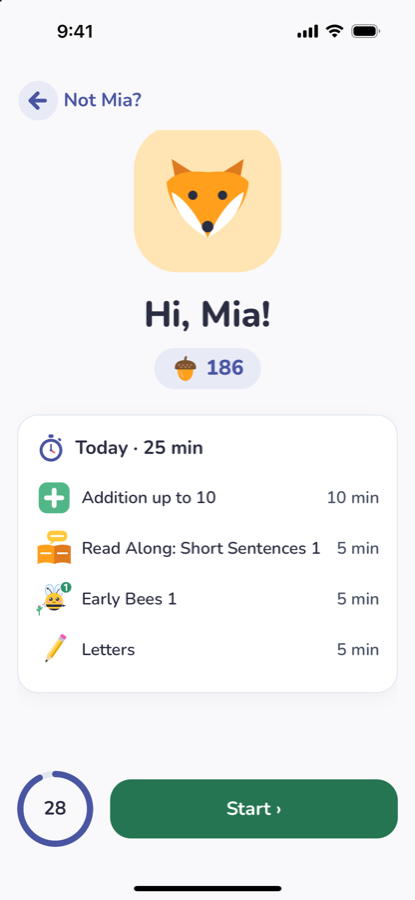
Your child taps their picture and works through a short daily routine you set: math, reading, spelling and writing lessons that re-teach until they stick, then chores like making the bed. Each one earns acorns toward real rewards you choose. For kids 4–10.
Already have an account? Sign in
Under three minutes on one family’s evenings, and the idea behind Steady Learners.
This is how it went in our house. Every family is different.
I was the teacher, the reminder and the enforcer. I re-explained lessons, reminded the kids about homework every day, and sat beside them. They waited to be told. Treats were taken for granted.

The kids started running a short daily routine themselves: lessons first, then their chores.

Now they start without being asked. They save up for things and value them more. And we got our evenings back.
They start without being asked, and they value what they earn.

You set the routine: which lessons, and how many minutes. The app teaches each lesson itself and reads every question aloud. When your child gets something wrong, it shows step by step how to solve it, and keeps practising until the lesson is mastered. You don’t have to be the teacher.
Add daily tasks like brushing teeth, making the bed or practising an instrument. Your child marks each one done, and you approve it. Finished lessons and tasks earn acorns.
They star in hundreds of picture books your child reads in the app. Tap one to say hello.
Simple for kids: they tap their picture and press Start. That’s it. We don’t make it hard, and we don’t turn it into a game.
 1
The lessons, the minutes and the daily tasks.
 2
Lessons first, then their tasks.
 3
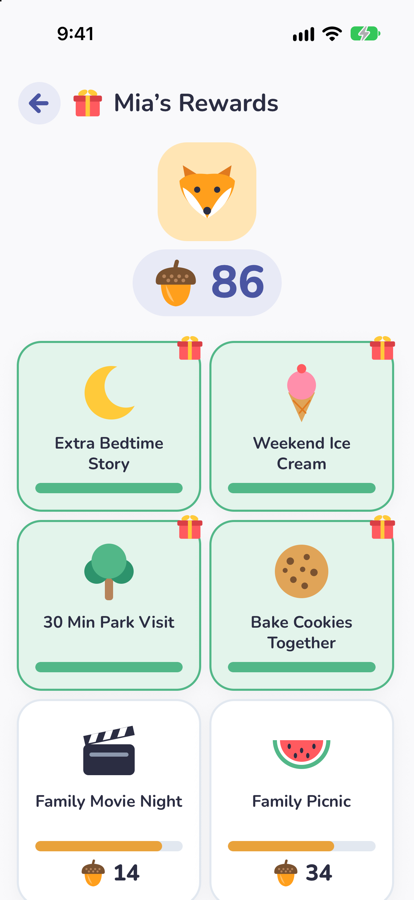
Acorns buy the rewards you choose.
Acorns are earned, never bought. You decide what they buy.

Each finished lesson earns acorns, and more when your child does better than last time. Each task you approve earns more.

An extra bedtime story, weekend ice cream, a 30-minute park visit, baking cookies together. Or make your own, at any price.

Say a trip to the park costs 200 acorns. It takes a while to earn, so when it comes, it means more.
Daily tasks and the reward store come with All-Access.
Aligned with Common Core math, K–5. Reading, phonics and grammar are built around Common Core skills. What is Common Core?
Counting to fractions, kindergarten to 5th grade.
Picture books with Tuck. The app listens as your child reads.
Letter sounds, then 3,000 words.
From tracing letters to short paragraphs.
Every lesson is free. All-Access adds the rest of the routine.
$0
$4.99 / month
or $49.99 a year
First 14 days free on every new account. Cancel any time. Refund policy
Kids ages 4 to 10, from pre-K through 5th grade. Each child starts at the level that fits their age, and moves on only once they’ve mastered a lesson.
Math from counting to fractions and decimals, reading with books read along and listened to, phonics and spelling with 3,000 words, and writing — as one daily routine that you set.
No. Every question is read aloud, and the app teaches each lesson itself. When your child gets something wrong, it shows step by step how to solve it and keeps practising until the lesson is mastered. You set the routine once, and your child works through it every day.
Yes. It’s built to go hand in hand with school: the lessons follow the same Common Core skills your child learns in class, so a few minutes a day after school gives extra practice on exactly what the class is working on, and the weekly report shows you what improved. See our guide to practicing school learning at home.
Yes. It gives homeschool families one daily routine of math, reading, phonics, spelling and writing. Every Kindergarten to Grade 5 Common Core math standard has its own lesson, reading and grammar are built around the Common Core standards, each lesson moves on only once it’s mastered, and the Parent Portal shows what each child has mastered, with a weekly report. See our homeschool guides.
Every lesson and routine is free for 1 child. All-Access — up to 4 children, the reward store, brain games, Daily Tasks and weekly report emails — is $4.99 a month or $49.99 a year, with the first 14 days free. Make your account before December 5 and you get 1 year of All-Access free.
No ads. Lessons come first: games and rewards open only once today’s lessons are done, and the Parent Portal is behind your PIN.
Now. Steady Learners is on the App Store for iPhone and iPad, and works in your browser on a computer, Chromebook or tablet at app.steadylearners.com. The Android app is coming soon. Accounts made before December 5, 2026 get one year of All-Access free.
Get Steady Learners on the App Store for iPhone and iPad, or use it in your browser on a computer, Chromebook or tablet. Make your account before December 5 and you get a year of All-Access free. Android is coming soon.
Try it free in your browserFree lesson videos on YouTube. News on Facebook and TikTok.